January 6: the line it came withJanuary 6: discharging the tubeJanuary 18: new capacitorsJanuary 28: it worked
I found the SE on Craigslist for $50, with a line across its screen. To fix it, I learned to solder from YouTube, then replaced all 150 capacitors on its power supply, logic board and analog board. The Classic II got the same treatment.
The tube came first: a wire to ground and a long screwdriver under the anode cap, since a CRT holds a dangerous charge.
Cleaning the boards and reseating the RAM didn’t fix the line. I was ready to give up when a friend said to recap it and check the solder on the display connector.
2026: the SE hangs at a grey screen. The BlueSCSI’s log shows its dead hard drive still answering the SCSI bus.
NowWaiting on a new hard drive.
Read more
Opening it up
The tube came first. A CRT can hold a dangerous charge long after it’s unplugged, so I tied a wire to ground and slid a long screwdriver under the anode cap. Then the cables for the floppy, the hard drive, the yoke, the sound and the display came out, gently, since the tube’s neck snaps easily.
Chasing the line
One bright line means the picture’s vertical sweep has stopped. Clean boards and reseated RAM didn’t bring it back, and the display cables tested live. On a friend’s advice I re-soldered the display connector and replaced every capacitor on the three boards, ordering each value from the schematics.
The grey screen
In 2026 it boots from a BlueSCSI until the disk driver loads, then stops at a grey screen. The BlueSCSI’s debug log showed why: the dead internal drive still answers when the driver scans the SCSI bus, and the scan never finishes. Unplugging that drive’s power should let it boot from the SD card; a new drive is the plan.
By the numbers
Machine
Macintosh SE · 1987
CPU
Motorola 68000 · 8 MHz
Paid
$50, on Craigslist
Replaced
150 capacitors
Working
January 28, 2021
Disk
System 6.0.8 · on a BlueSCSI v2
The iMac G4 as a display
August 2025
Out came the 2002 logic board, in went a Juicy Crumb board. The screen on the chrome arm is now a display for my MacBook, and it looks stunning.
A 2010 MacBook on Linux Mint
April 2026
Linux Mint with i3, and four workspaces: terminal, internet, Obsidian, random. It plays my Jellyfin library, and with that keyboard, it’s where I write.
NowMy fun laptop.
Read more
Getting there
It arrived on April 20. With the SSD from my PC inside, it booted Windows 11 and then bootlooped, so it got Linux Mint with XFCE, which has Windows 2000 vibes. Then the i3 window manager went on top, customised a lot.
How I use it
Each of the four workspaces has an icon in the bar along the bottom. It plays my Jellyfin library and reaches the NAS over SSH, and the first note I wrote on it called it a fun laptop for Obsidian writing. That’s the keyboard’s doing.
By the numbers
Machine
MacBook · white, 2010
CPU
Intel Core 2 Duo
System
Linux Mint XFCE · i3
Workspaces
terminal · internet · Obsidian · random
Arrived
April 20, 2026
The homelab
May to June 2026
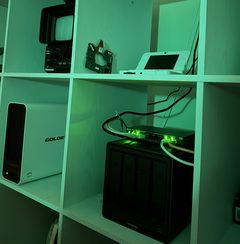
My homelab lives on a white IKEA shelf. A NAS holds the family’s films, music, photos and books, and in June I built a GPU server for local AI and for Claude Code.
GoldenMate LiFePO4 UPS · the NAS tells the rest when to shut down
Read more
Who does what
The NAS runs 42 containers: films, music, photos, books and the dashboard. The GPU server does the heavy lifting, local models in Ollama and the face and smart search for the family’s photos, which used to pin the NAS’s Pentium. If the GPU is busy, the photo library quietly falls back to the NAS’s own processor.
Sharing one GPU
Now and then the A2000 goes to a Windows virtual machine. A hook stops everything using the card before handing it over and starts it all again after. The first version restarted the AI mid-handoff, which hung the NVIDIA driver so hard that only the power button could reboot it, so now the handoff only ever stops things.
Upkeep
In August I updated 18 containers across two machines with no failures. The update tool I’d used spoke a Docker API too old for today’s Docker, so a maintained fork replaced it, and the photo library stays pinned, since its database upgrades are one-way. Every app shares one dark theme, injected by a small nginx sidecar where an app has no setting for it.
By the numbers
Containers
42 on the NAS
Models
Gemma 4 · Qwen 2.5 · Qwen 3.5
Monitoring
Prometheus · Grafana · Wazuh
UPS
about 104 minutes of runtime
Shutdown
begins at 15% battery
August
18 containers updated · no failures
An off-site backup in Michigan
June to July 2026
In June I added a Dell OptiPlex to a friend’s server stack in Michigan, and it keeps a second copy of the NAS’s photos, video projects and the rest. It stays off all week: on Sunday night its BIOS switches it on, the NAS sends the week’s changes with restic, and then switches it off again.
At first Michigan pulled the files itself. It took over 25 hours and was killed mid-run, so now the NAS pushes.
The first scheduled run fired at 2 a.m. Monday: the timer read local time. Everything runs on UTC now, so daylight saving can’t move it.
Tailscale showed the server green while it was switched off. I trust “last seen” now, not the icon.
NowEleven snapshots, the oldest from July, and green on the dashboard.
Read more
Every Sunday
On Sunday night the box’s BIOS switches it on. Ten minutes later a timer on the NAS waits for it to answer, pushes the week’s changes with restic, and switches it off over SSH, about twenty minutes after it woke. If the NAS never does, the box switches itself off after 26 hours.
Why it works this way
Dell’s Auto On reads the clock with no idea of time zones, so the clock is kept on UTC and daylight saving can’t move the wake. Pushing beat pulling: the first scheduled push added 666 MiB in about seven minutes. The 2012 BIOS has no modern interface, so I read its wake schedule over SSH with libsmbios instead of a monitor and keyboard.
Keeping watch
A script on the NAS records each run for Prometheus, touching the box only while it’s awake, and a daily job ages the result, so the dashboard knows how old the last snapshot is while the box sleeps. Under 8 days is green, up to 14 is amber, older is red; I tested red by breaking it on purpose.
By the numbers
Box
Dell OptiPlex 7010 · 2012
Backed up
about 276 GB
First copy
222 GiB · checked clean
Keeps
8 weekly · 6 monthly
Awake
about 20 minutes a week
Fallback
off by itself after 26 hours
Mission Control
July 2026
Every service in the house on one dark page: a dashboard I rebuilt in July, with a map of both sites and a page for each machine. Anything here that points at my house is blacked out.
A Dell OptiPlex under my bed does the watching: Prometheus, Grafana and a Wazuh security monitor, with Home Assistant beside them.
Read more
Watching
Prometheus scrapes every machine every 15 seconds: each host, each container through cAdvisor, and the GPU’s temperature, load, memory and power. Grafana draws a dashboard per machine, built as JSON and sent in through its API, plus one for the off-site backup.
Security
Wazuh watches logins, sudo and the files that matter on the NAS and the GPU server, and keeps alerts for 90 days. I wrote rules for brute-force logins, root logins and new accounts, then tested them the honest way: failing SSH on purpose, adding a test user, dropping in a cron file.
The dashboard
I rebuilt it in July with a page per machine, in the same navy and neon cyan as the rest of my apps. The map on its home page is one inline SVG of about 7 KB, drawn by a script: a 75-point outline of the US, a dot pattern instead of thousands of circles, and an animated link between home and Michigan.
By the numbers
Scrapes
every 15 seconds
Exporters
node · cAdvisor · NVIDIA GPU
Security
Wazuh · alerts kept 90 days
Map
one SVG · about 7 KB
Built
June 20 · rebuilt July 3
Claude Code on a Macintosh Classic II
July 2026
The Classic II boots System 7.1 from a BlueSCSI and logs in to the GPU server over its modem port, in ZTerm, at 19,200 baud.
Claude Code draws in Unicode. A small Python program turns ❯, ✻ and its rounded boxes into > * and +-+.
tmux’s borders came out as rows of the letter q. Now it draws without them.
Ubuntu printed escape codes at every prompt, garbage on a VT100. Serial logins skip them.
How it talks
Classic IIZTerm, VT100
modem port
DIN-8 to DB-9serial cable
RS-232
USB serialFTDI adapter
USB
Linux servergetty, tmux
made ASCII
Claude Codein the homelab
The Oregon Trail, by wire
Claude readied the game on the server, and it came down the same line by ZMODEM: just the app, not the 48-minute disk. Claude left starting the transfer to me, since an unready Mac would hang the session.
Read more
The line
The modem port runs through a DIN-8 to DB-9 cable and an FTDI USB adapter into the GPU server, where a serial login drops straight into tmux. ZTerm 1.0.1 plays the VT100, with its modem init string left blank, since the default AT commands confuse the login.
Making Claude fit
Claude Code draws in Unicode, so a small Python program sits in between and turns its prompt, spinner and rounded boxes into ASCII, and serial logins run with LANG=C. Wide emoji still arrive as two question marks. For the cleanest output there’s a teletype mode that prints one answer at a time.
The disk and the game
A BlueSCSI v2 on the external SCSI port, powered by the Mac itself, serves 2 GB disk images from a 32 GB SD card. The Oregon Trail came down by ZMODEM through a helper that steps tmux aside and back. ZTerm has to decode MacBinary, or the app arrives without the resource fork it needs to launch.
By the numbers
Machine
Macintosh Classic II · 1991
CPU
Motorola 68030 · 16 MHz · no FPU
Screen
512 × 342 · one bit
System
7.1 · on a BlueSCSI v2
Line
19,200 baud · 8-N-1
Terminal
ZTerm 1.0.1 · VT100
Films in one bit
July 2026
MacFlim plays 1-bit video on compact Macs. Its encoder streams a music video straight from my Jellyfin server and dithers every frame to black and white, and the Classic II plays it from the BlueSCSI’s SD card.
An ffmpeg upgrade broke the encoder, so it runs in Docker now.
A GPU made it only 6% faster: the dithering runs on one core, so the gain is in encoding several at once.
NowFour on the card: Interstellar, Project Hail Mary, Memory Reboot and Fainted.
Read more
From Jellyfin to the card
MacFlim’s encoder reads each video straight from Jellyfin by its URL, so nothing is downloaded first, and dithers every frame for the Classic II’s screen. The two widest are letterboxed; the 16:9 ones are zoomed to fill it, which would crop over a third off a 2.4:1 film.
Getting them onto the Mac
Over the serial line the four would have taken about 35 hours. Instead the SD card went into the NAS, the files came across the network in 2.4 seconds, and two small tools set each file’s type and creator so the player knows them.
Why the GPU didn’t help
The slow work, Floyd–Steinberg dithering and a search for the best encoding of each frame, runs on one CPU core with no GPU path. On a 20-second clip the GPU saved 6%; running several encodes side by side is how to use the other seven cores.
By the numbers
Films
4 music videos · 18.5 minutes
On the card
about 243 MB
Rate
16–21 MB a minute
Encoding
about 12 minutes for all four
Screen
512 × 342 · one bit
A status board in one bit
July 2026
ADI-Datacenter is a System 7 app in C, built with Claude and the Retro68 compiler. It shows the homelab’s health and, while music plays, twelve album covers in one bit and a waveform at eight frames a second.
Dark album art dithered to near-solid black until the contrast was stretched first.
The waveform was too slow for a 68030. Sharing one curve between its four ribbons cut the work per frame by eight.
NowIt only listens: the modem port is busy with the login to Claude.
Read more
What it shows
Two screens, switched with the space bar: the machines with their services and load, and a music screen with a 4 by 3 grid of album covers and the waveform. A Python program on the GPU server gathers the numbers, from service checks, Prometheus and the GPU, and sends them down the serial line as text every 30 seconds.
One bit, eight frames a second
Covers are scaled to 64 by 64 and dithered with Atkinson’s method, MacPaint’s own, after stretching their contrast. The waveform is four nested ribbons drawn from one curve, line weight standing in for colour. Interpolating once per frame instead of once per ribbon cut 384 divides to 48, and only the waveform’s strip, about 5% of the screen, is redrawn.
Receive only
The app never sends a byte: the same port carries my login to Claude, and anything it sent would be typed into that session. To keep the screen from burning in, the whole layout shifts a pixel every minute.
By the numbers
App
about 32 KB of C · Retro68
Memory
a 512 KB partition
Updates
every 30 seconds
Waveform
8 frames a second
Covers
12 · 64 × 64 · Atkinson-dithered
Tests
81 checks · fed 7 bytes at a time
Siri on a 2012 iPad
August 2026
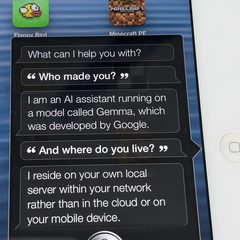
iOS 6 Siri stopped working when Apple shut its servers. My tweak catches what you say and sends it to the GPU server, where Whisper transcribes it and Gemma 4 answers, and the reply comes back in Siri’s own cards.
An offline Siri tweak already on the iPad proved it could be done. I replaced it with my own, built without Theos.
Most search engines wouldn’t answer my server, so it reads Wikipedia.
NowWeather, answers, and cards for the Tesla solar panels and the Mustang Mach-E.
Read more
How it hears you
The tweak lives inside iOS 6’s assistant daemon. It copies the microphone’s audio as Siri records, so Apple’s own end-of-speech detection still runs, and sends it to the GPU server, where faster-whisper writes it down. Apple’s connection is stubbed out, so there’s no fake Apple server and no 2012 protocol to imitate.
How it answers
Gemma 4 first picks what kind of request it is from a fixed list, then fills in the details. A handler fetches live data, and the reply goes back as Siri’s own objects, so every card is drawn by Apple’s 2012 code. Routing used to be pattern rules, until “what camera should I film with” brought up a movie called With.
Keeping it honest
An early version said it had set a timer, four times out of four, with no timers at all. Now anything that acts on a device is gated, and the car card only ever says the horn was sent, since no sensor can confirm a honk. The Mach-E and solar cards are web pages for Safari 6: no flexbox, prefixed gradients, fonts cut down to the glyphs they draw.
By the numbers
iPad
4th generation · iOS 6.1.3
Speech
faster-whisper
Model
Gemma 4 12B · on Ollama
A stock quote
about 4 seconds
A search
15–21 seconds
Public build
on my Cydia repo · without the house cards
What’s next
A new hard drive for the SE.
A second serial adapter on the Classic II’s printer port, so the status board can talk back.
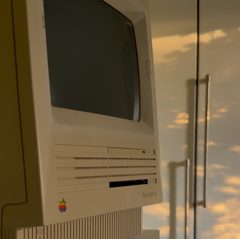 Macintosh SENeeds a hard drive
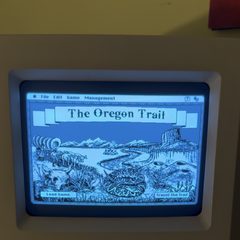 Macintosh Classic IITalks to Claude
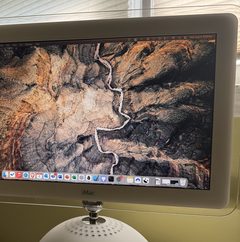 iMac G4A display again
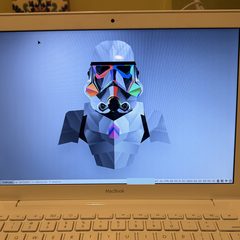 MacBookLinux Mint
 iPad, iOS 6Siri, on my server
 The homelabRuns the rest


