Athene Docs › Listen
Listen
Listen reads a book aloud in a natural voice that runs on your device, and keeps reading with the screen locked. It reads books in English, French and Italian, and PDFs too.
The voices
The first time you tap Listen, Athene offers Natural voices: a free, one-time download of 242 MB. Listen needs it for every language and every voice, so start it on Wi‑Fi. When it finishes, reading begins where you asked, if the Listening sheet is still open. The download comes from Hugging Face, where the voice model is published; after that, reading aloud happens entirely on your device, and neither the words nor the sound leave it.
To take the voices off your device, open the Listening sheet and tap Remove Natural Voices. They aren’t part of your device’s backup, so after restoring to a new device you download them again.
Starting and stopping
Tap the headphones while you read and Athene reads from the first word on the page. To start somewhere else, select a word first and then tap the headphones. Tap them again to stop.
The sentence being read is shaded on the page, and the page turns with the voice. Turn a page yourself and the page stops following, while the voice carries on.
The headphones appear in books Athene can read aloud: English, French and Italian. It tells the language from the book itself, so there’s nothing to set.
The player
While Athene reads, a player takes the place of the page number:
| Previous, Next | Back or on one sentence. |
|---|---|
| Play, Pause | Pauses and carries on. |
| Speed | From 0.5× to 2.5×, in steps of 0.05×. The new speed starts when you lift your finger. |
| Voice | Opens the Listening sheet: the voices, the speed and the sleep timer. |
| Sleep Timer | The moon. Off, 15 Minutes, 30 Minutes, 45 Minutes, 1 Hour, or End of Chapter (in a PDF, when it has a table of contents). |
In a book, the line at the top of the page says how many minutes are left in the chapter; in a PDF, the player shows the page.
Choosing a voice
Open the Listening sheet (Voice on the player) and tap a voice’s play button to hear it.
| English | Heart, Bella and Michael, American; Emma and George, British. |
|---|---|
| French | Siwis, and Apple’s Audrey. |
| Italian | Sara and Nicola, and Apple’s Federica and Emma. |
You choose a voice for each language, so a French book is read in your French voice and an English one in your English voice. The sheet lists your device’s language and English first; the others are under More languages, with the book’s own language at the top.
Apple’s voices
Audrey, Federica and Emma are Apple’s Premium voices, free in your device’s Settings. An app can’t download them for you:
- Open Settings, then Accessibility › Read & Speak › Voices.
- Choose French, then Audrey; or Italian, then Federica or Emma.
- Download the Premium version.
It appears in the Listening sheet, ready to choose, once it has downloaded.
Locked, or in another app
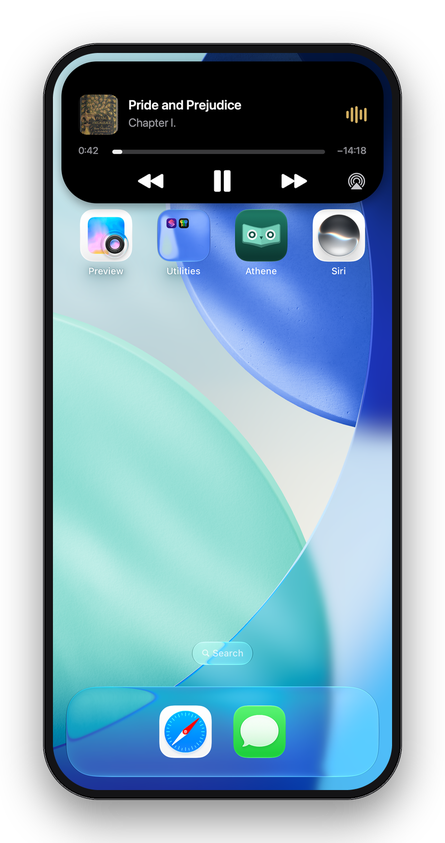
Lock your device, or go to another app, and Athene keeps reading. The Lock Screen and the Dynamic Island show the book, the chapter and the cover. Their skip buttons, like your headphones’, go back or on a sentence. A call pauses the reading, and it carries on afterwards. Unplugging your headphones pauses it.
PDFs
Listen reads a PDF the way you would. It skips running heads, page numbers, footnotes and text running up the margin, leaves out reference brackets and web addresses, joins words broken across lines, and reads a sentence that runs over a page break as one. It reads scanned pages too, recognising their text on your device.
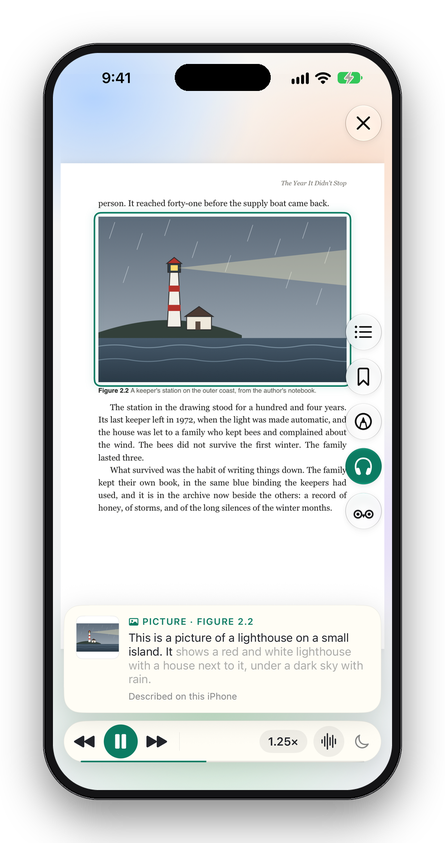
When it reaches a picture or a table, it describes it: in the PDF’s own words when the PDF has them, or, on iOS 27 with Apple Intelligence, in a description made on your device. Otherwise it reads the caption and goes on. Describe Pictures on the Listening sheet turns this off. Pictures in books other than PDFs aren’t described.
If there’s nothing left to read from the page you’re on, Athene says Nothing to Read Aloud.
Written for Athene 3.4. Something here wrong, or missing? Write to athene@theadipost.com.