Athene Docs › Look Up & Translate
Look Up & Translate
Select a word to see what it means, how to say it and how often the book uses it. Select a passage in another language to translate it.
The dictionary
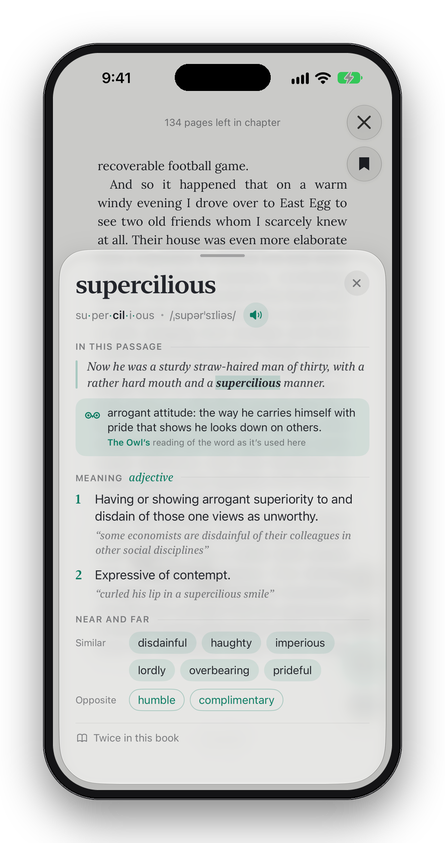
Select a word, or a short phrase of up to four words, in an English book. The menu that appears shows the word, its part of speech, how to say it and its first meaning, chosen by how the sentence uses it: saw in “I saw him” is read as the verb see. Tap the meaning for the whole entry:
- The word in syllables, the stressed one in bold, and how it’s said. With the Listen voice downloaded, the speaker button says it aloud.
- In this passage: the sentence it came from. When the Owl answers on your device, it says what the word means there as the entry opens. With your own Ollama server or an API key, tap What does it mean here? to ask it. If the Owl has no model to answer with, this part doesn’t appear.
- Meaning: up to three meanings, with Show all for the rest, and Also for the word as another part of speech.
- Near and far: words that are Similar and Opposite. Tap one for its own entry, and the word you came from, at the top, to return.
- How often the word appears in this book.
- More in Dictionary, when Apple’s dictionary has the word too.
The dictionary is built into Athene, from Open English WordNet and the CMU Pronouncing Dictionary, and works with no connection. It is English only: in a chapter in another language it doesn’t appear.
Look Up
When Athene’s own dictionary has nothing to show for a word, and Apple’s dictionaries on your device have it, the menu offers Look Up, which opens Apple’s. That’s how to look up words in a French or Italian book: add a dictionary for that language in Settings › General › Dictionary on your device.
Translate
Select a passage and tap the translate button in the menu. Apple’s translation opens over the page, detects the language, and translates into any language Apple offers. It works in PDFs too. The text is translated by Apple’s Translate, under your device’s own Translate settings.
Written for Athene 3.4. Something here wrong, or missing? Write to athene@theadipost.com.