Athene Docs › Ask the Owl
Ask the Owl
The Owl is a reading companion for the page in front of you. Ask who a character is, what a word meant then, or what just happened, and it answers from the pages around where you are. It never reads the whole book, so it can’t give away the ending.
Asking
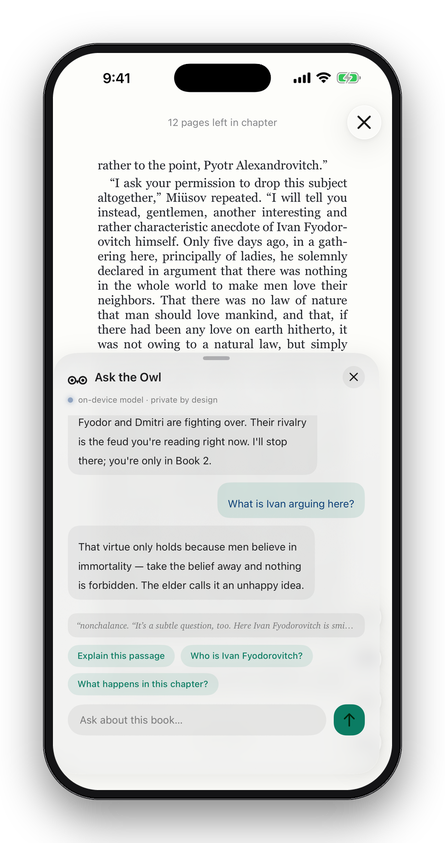
In a book or a PDF, tap the owl, the lowest of the buttons on the right. Type a question in Ask about this book…, or tap a suggestion: Explain this passage, Who is …? for a name on the page, or What happens in this chapter? (on this page?, in a PDF).
- To ask about particular words, select them in a book and choose Ask the Owl: the words go with your question.
- In the dictionary, the Owl can say what a word means in its sentence.
On iPhone the Owl rises from the foot of the screen; drag it up for more room, or down to close it. On iPad it opens beside the page, which you can keep reading. The conversation ends when you close the Owl; nothing is saved. There’s no daily limit.
What the Owl reads
The Owl is given the pages around where you are, some before and some after, from the chapter you’re in; in a PDF, the page and up to two pages either side. With it go the book’s title and author, where you are, your selection, and the last few questions and answers. It is never given the rest of the book, or any other book, and it’s told to say so when the pages in front of it don’t have the answer.
| On your device | About four pages. |
|---|---|
| Ollama or a key | This passage (about a page and a half), or Whole chapter (up to about five pages), set under Context on Meet the Owl’s Ollama card; it applies to a key too. |
Where the answers come from
Open Settings › Ask the Owl › Answers from, or Bring your own model in the Owl, for Meet the Owl, which offers three.
On this iPhone or iPad
Apple Intelligence’s own model, already on your device. There’s nothing to set up, and nothing you ask leaves the device. It needs an iPhone 15 Pro or later, an iPad with an M-series chip, or an iPad mini (A17 Pro), with Apple Intelligence turned on in Settings › Apple Intelligence & Siri.
Your Ollama server
Any model your own computer runs with Ollama, reached over your network or your VPN. Enter the Server Address with Ollama’s port, like http://books.local:11434, and tap Test Connection. Then choose a Model from the ones your server has, and the Context, which a key uses too.
Your API key
A key from Claude (Anthropic), OpenRouter or OpenAI. Paste it in Key; Athene tells the provider from the key, and Find Models checks it and lists the models you can use. The questions you ask are billed to your account with that provider. The key is kept in your device’s keychain, on this device only. To change it, paste another over it.
Before a question leaves your device
An answer from your device needs no permission. Before the first question goes to an Ollama server or a provider, the Owl shows a card, Before your first question, naming exactly where the passage and your question will go. Choose Allow & Ask or Not now. Athene asks again for any new address.
To take your permission back, turn off Settings › Ask the Owl › Questions may leave this device and tap Revoke. The Owl goes back to answering on your device.
When it can’t answer
- The Owl needs a model
- Apple Intelligence is off, still downloading, or not available on this device, and there’s no server or key. Turn on Apple Intelligence, wait for it, or tap Bring your own model.
- Apple’s on-device safety filter stopped this one
- Apple’s model declined the passage. Fiction sets the filter off more often than you’d expect; ask about another part of the page, or in other words.
- More than the on-device Owl can hold at once
- Select a shorter passage and ask about that.
- The on-device model doesn’t read this language yet
- Apple’s model doesn’t cover the book’s language. A server or key may.
- This page has no text the Owl can read
- The page is a scan, a picture of text. The Owl reads text only.
- … refused this key, or has no credit left
- Check the key, or the account’s balance, with the provider.
- That address answered, but not like an Ollama server
- The address or port is wrong. Ollama listens on 11434 unless you changed it.
Written for Athene 3.4. Something here wrong, or missing? Write to athene@theadipost.com.